Contact Us
1-800-234-4232
Email  E-mail Sales
Email  E-mail Tech Support
Call Me Call Me Now
Distributors  Find a Distributor
Sign Up For MCC eNews!

Product Selection Guide

My Cart

Items: 
Subtotal: 
Shipping: 
Cart View Cart

InstaCal

Installation, Calibration, and Test Utility

Key Highlights

Easy to use

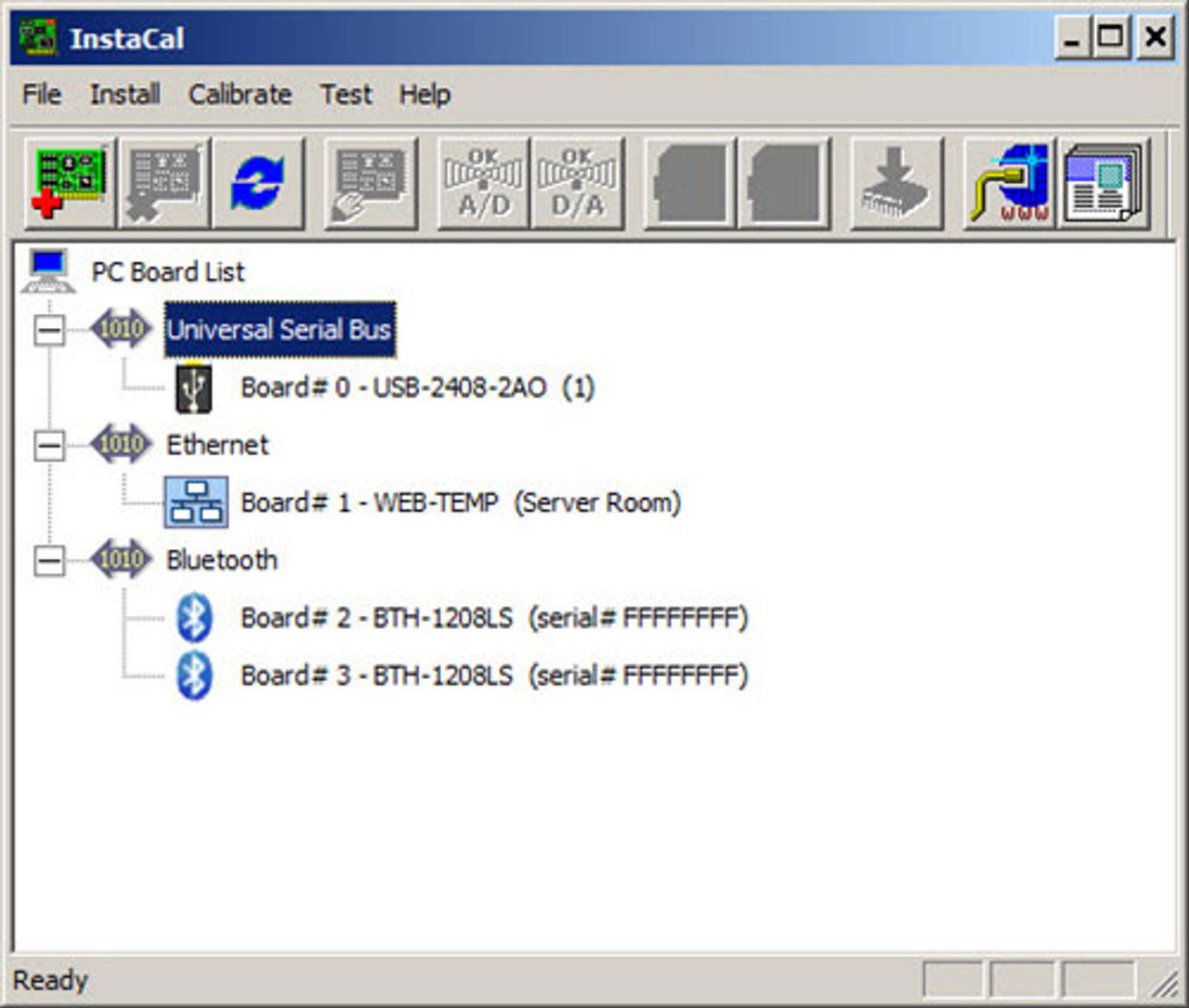
Plug and play—automatically detects hardware and assigns resources for USB, PCI, PCMCIA, Web, and wireless boards

Included on MCC DAQ CD

Supports most MCC hardware, see specific hardware products for compatibility details

Download InstaCal here

 
InstaCal

[+] View Larger Image

  • Pricing
  • Overview
  • More Info
Part Number Description
Prices shown are in U.S. dollars for orders placed within the U.S. For international orders, please contact one of our distributors in your area.
InstaCal Installation, calibration, and test utility
Included

Easy-to-use installation, calibration and testing: InstaCal is a comprehensive software utility that manages everything about your data acquisition hardware. When you plug in a USB, PCI, PCMCIA, Web, or wireless product, InstaCal detects the hardware and assigns resources automatically. You can set special features of the hardware so your software programs will run as you wish. All the settings are stored in the Measurement Computing configuration file.

Once your board is installed, you may want to check calibration. InstaCal walks you through a professional calibration procedure tailored to the board you own.

Have doubts about a function? InstaCal will test the board both internally and externally, giving you complete confidence in the board's operation. If a problem is found, it is clearly identified and a detailed report is generated which will speed a complete repair.

Simple, full function tests: Installation of a Measurement Computing data acquisition board is a snap with the USB, PCI and PC-card, Web, and wireless plug & play standards. Just install the hardware and let the operating system do the rest. It is that easy! Gone are the days of setting switches and jumpers. Now you are ready to select the special features of the board that control your measurements. Everything else will be taken care of by the data acquisition program you use.

For legacy systems such as Windows 3.x, or for ISA and PC/104 boards, you need to set those switches and jumpers then configure the software to recognize your board. InstaCal will take you right through that process with diagrams of switches and lots of helpful suggestions for avoiding conflicts.

Calibration is automatic for boards with software calibration, and easy for boards with potentiometers. All of Measurement Computing's data acquisition boards come with software auto calibration. Special circuitry and precision references on the board allow software to complete a calibration cycle without intervention on your part. Calibration is as easy as choosing the Calibrate icon in the InstaCal menu bar, and starting a calibration cycle.

Test: From time to time, we all want to test our measurement instruments. Maybe we doubt a reading, or the values displayed by our favorite program, or even if the code we are writing is doing what we want it to. With InstaCal. you have a factory certified and dependable way to verify those readings. Click on the Test icon and InstaCal will test all of the board's internal registers. When you are satisfied with those functions, it is time to hook up a signal and test the input electronics or control electronics. InstaCal draws you a picture of the signals to connect, stimulates the electronics, and gives you a reading that you can depend on. InstaCal will help you quickly indentify and resolve problems.

The Following Resources are Available:
Product Data Sheets – Here you will find a listing of current Product Data Sheets which provide a general overview of product features and specifications from both Measurement Computing and IOtech.
Product User's Manuals – Here you will find the latest product User's Manuals and Quick Start guides.
Technical Support – Measurement Computing offers free technical support and a variety of product support options online.
Product Application Notes – Here you will find a collection of IOtech's test and measurement systems and instruments
used in a variety of actual customer applications and environments.
Download Latest Software – Visit our FTP site to obtain the latest software drivers, libraries, and evaluation packages.
Repairs and Warranties – Learn more about our Repair and Calibration services, Limited Lifetime Product Warranty, and Limited Lifetime Harsh Environment Program